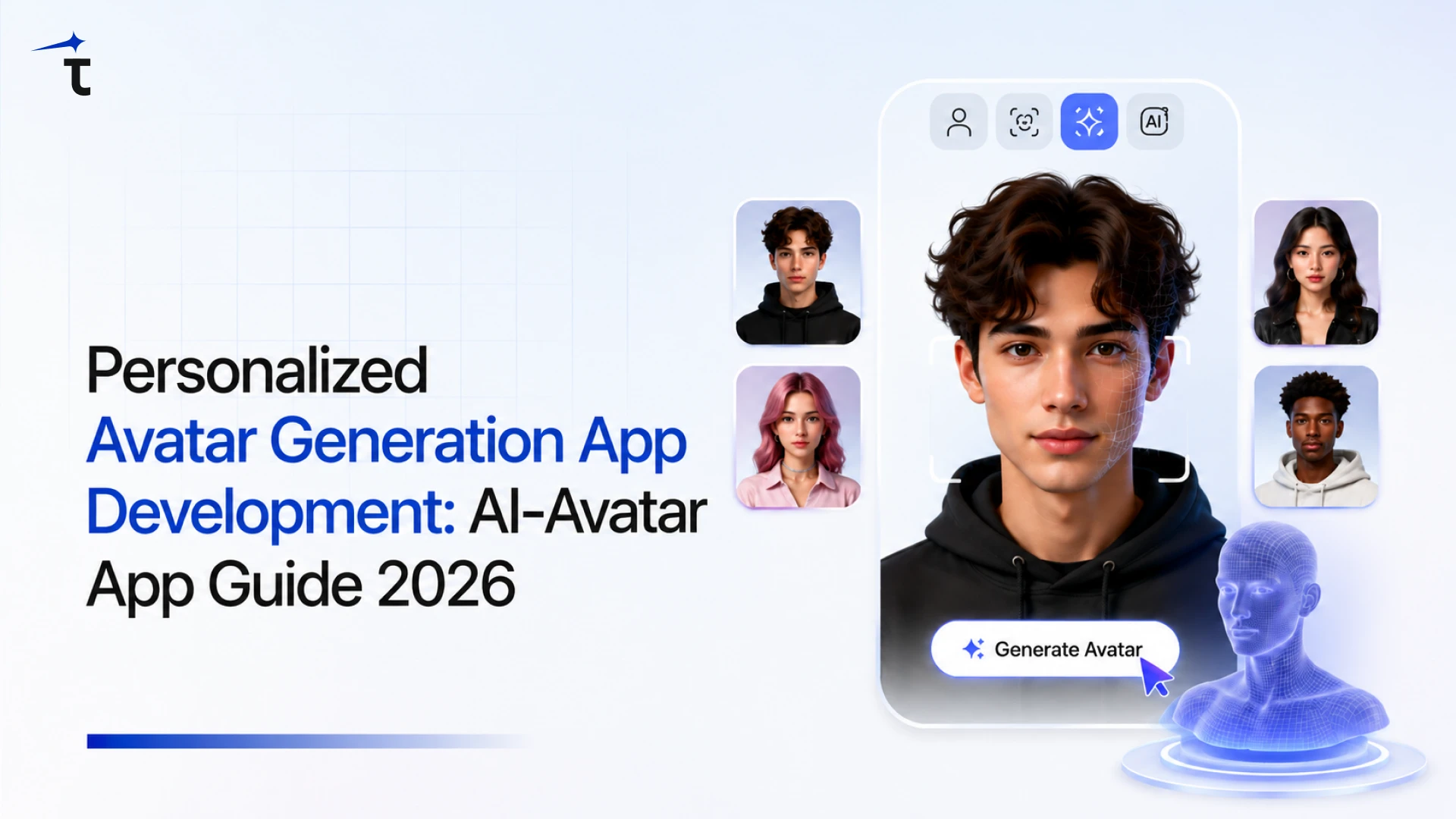
The demand for digital identity is growing fast, and personalized avatar generation app development are the center of this shift. From social media filters and gaming characters to metaverse avatars and virtual meetings. Instead of using generic profile pictures, users prefer avatars that reflect their personality, style, and mood.
These avatars are not just fun to create, they also make online interactions feel more personal and engaging. Whether it’s for social media, gaming, or professional branding, custom avatars are helping people stand out in a crowded digital space.
In 2026, businesses and startups are increasingly turning to AI‑avatar generation app development to stay competitive. Whether you are searching for how to build an AI avatar app, estimate avatar generator app development cost, or plan a full avatar creator app, this guide will help you through every step required for AI-Avatar Generation App Development.
Key Takeaways
- Personalized Avatar Generation App Development is becoming a core part of online identity thanks to AI, AR/VR, and the Metaverse.
- They make digital communication more engaging and help users express themselves in a unique, visual way.
- Businesses and individuals use avatars to strengthen social media presence, brand identity, and virtual experiences.
- A good avatar app needs simple onboarding, style variety, real‑time previews, and easy sharing options.
- Cost to develop an AI‑avatar generation app depends on features, platforms, AI model choice, and design depth.
- Common use cases include social media, gaming, virtual meetings, training, and e‑learning environments.
- Future trends point toward real‑time animated avatars, voice‑driven expressions, AR glasses, and white‑label solutions.
- A clear development strategy idea, design, tech stack, testing, and iteration is key to building a successful avatar app.
Personalized Avatar Market Insights & Forecast
The personalized avatar generation market is witnessing impressive growth in 2026, driven by the rapid adoption of artificial intelligence, AR/VR, and digital identity solutions. According to Precedence Research, the global AI avatar market is projected to reach $12.9 billion in 2026, growing significantly from $9.78 billion in 2025, with a strong CAGR of over 30% in the coming years.
Additionally, Coherent Market Insights reports that the broader avatar economy, which includes virtual identities, metaverse avatars, and digital humans, is expected to hit around $18 billion in 2026. This growth is largely fueled by increasing demand for personalized digital experiences across social media, gaming, e-learning, and virtual branding. As businesses and users continue to embrace digital representation, avatar generation apps are becoming a key component of the future digital ecosystem.
What is a Personalized Avatar Generation App?
A personalized avatar generation app is a mobile or web app that turns your photo into a custom digital character that looks like you. Instead of a normal profile picture, you get a stylized version of cartoon, anime, realistic, or themed that you can use on social media, games, or virtual meetings.
The app uses AI to read your facial features and then lets you change styles, outfits, and expressions. It’s like creating your own digital twin in a fun, easy way. These apps are becoming popular because they make online identity more creative, personal, and engaging without needing any design skills.
Real‑World Uses of Personalized Avatars
Personalized avatars are quickly moving from trendy filters to real‑world tools across many industries. From social media to gaming, remote work, education, and marketing, these avatars are helping brands and users build stronger, more expressive digital identities.
Social media and personal branding
Personalized avatars help you stand out on Instagram, WhatsApp, and LinkedIn by turning your photo into a unique avatar. They boost engagement and make your profile more memorable in a crowded digital space.
Gaming and virtual worlds
In games and Metaverse platforms, AI‑avatar generation apps let players create characters that resemble them. This makes the experience more immersive and personal, fitting perfectly with avatar creator app development trends.
Remote work and virtual meeting
Teams use personalized avatars in virtual meetings and training sessions when cameras can’t be used. An AI‑avatar generation app gives a professional yet creative way to represent employees in digital workplaces.
Education and e‑learning platforms
Students and teachers adopt avatars in online classrooms to make learning more fun and interactive. These avatars help reduce shyness and build a stronger digital presence for learners using avatar generator app features.
Branding and marketing campaigns
Brands use personalized avatar apps to create digital mascots or customer avatars for campaigns. This supports avatar creator app development for businesses and helps deliver memorable, AI‑driven marketing experiences.
How the Avatar Generation App Works
An avatar generation app may look simple from the outside, but behind the scenes it combines AI, photo processing, and real‑time rendering to turn your selfie into a personalized digital character. Let’s break down how it actually works, step by step.
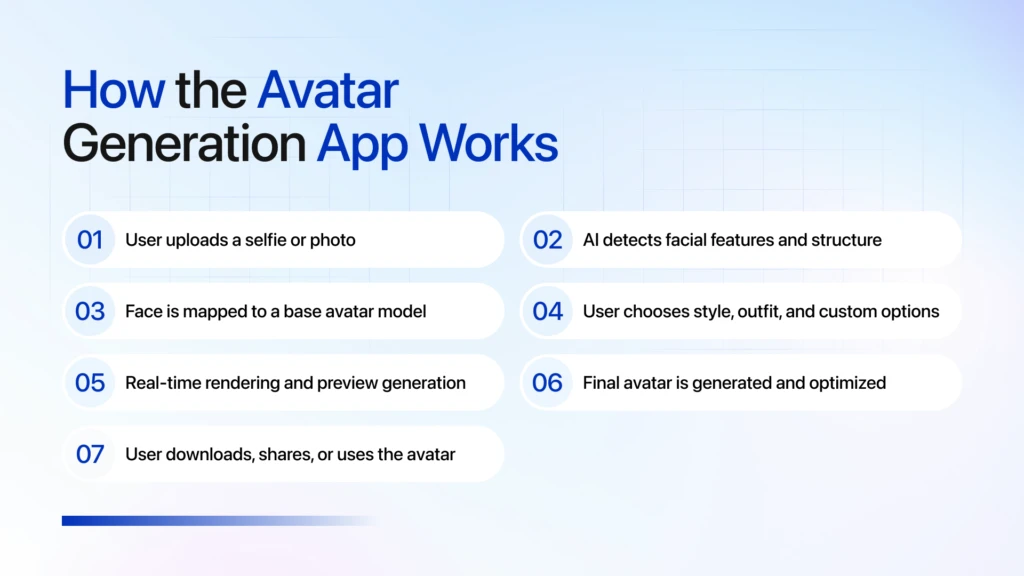
User uploads a selfie or photo
The user starts by uploading a front‑facing photo or selfie from their device. The app may guide them to avoid harsh lighting, hats, or heavy filters so the AI can read facial features more accurately.
AI detects facial features and structure
The system uses computer vision and AI models to detect key landmarks like eyes, nose, mouth, jawline, and skin tone. This creates a “digital map” of the face that the avatar engine will later stylize.
Face is mapped to a base avatar model
The detected facial data is mapped onto a 2D or 3D avatar template (cartoon, anime, realistic, etc.). This step preserves the user’s proportions while adapting them to the chosen style and model.
User chooses style, outfit, and custom options
The user can pick different avatar styles, hairstyles, clothing, colors, and accessories. Any changes they make are reflected in the preview, letting them experiment until they find a look that feels right.
Real‑time rendering and preview generation
As the user tweaks options, the app renders an updated preview almost instantly. This keeps the experience smooth and interactive, so users don’t have to wait long between tries.
Final avatar is generated and optimized
Once the user confirms, the system generates the final high‑quality avatar in the selected format (PNG, JPEG, or sometimes 3D/animated). The app may compress or optimize it for sharing and storage.
User downloads, shares, or uses the avatar
The finished avatar can be downloaded to the device, posted directly to social media, or exported for use in games, virtual meetings, or other platforms. This makes it easy to carry the same digital identity across different apps and experiences.
Must Have Features in a Personalized Avatar App
A strong personalized avatar app needs more than just filters; it should feel intuitive, creative, and fast. Here are key features that turn a basic avatar creator into a powerful AI‑avatar generation app in 2026.
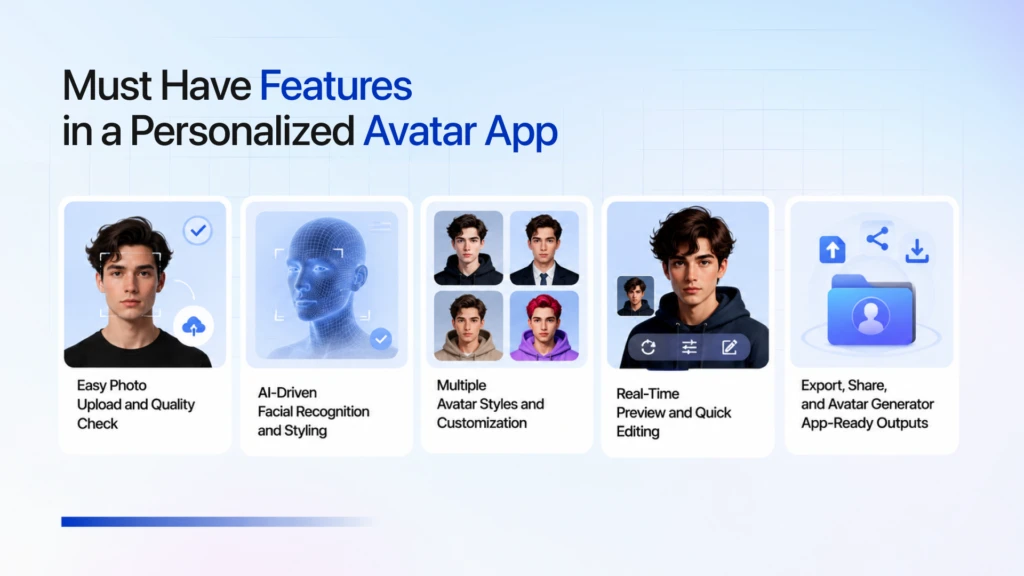
Easy Photo Upload and Quality Check
Users should be able to upload a selfie or profile photo in one tap, with automatic checks for brightness, focus, and angle. A simple, guided flow helps avoid blurry or poorly lit images that can ruin avatar quality and frustrate first‑time users.
AI‑Driven Facial Recognition and Styling
The app should use AI to detect facial features like eyes, nose, jawline, and skin tone, then map them into a stylized or 3D avatar. This lets users see an accurate digital version of themselves in cartoon, anime, or realistic styles without manual tweaking.
Multiple Avatar Styles and Customization
Offer a range of styles at least cartoon, anime, hyper‑realistic, and a couple of themed looks plus options for skin tone, hair, outfits, and accessories. The more flexible the customization, the more users will experiment and share their creations.
Real‑Time Preview and Quick Editing
A live preview that updates instantly as users change styles or outfits keeps the experience fun and engaging. Simple sliders or buttons for quick edits (hat, glasses, background) help users fine-tune their avatars without feeling lost in complex menus.
Export, Share, and Avatar Generator App‑Ready Outputs
Let users download avatars in multiple formats (PNG, JPEG, sometimes even animated or 3D) and share them directly to social media, games, or messaging apps. If you’re building an avatar generator app, clean, platform‑ready outputs make integration into other apps much easier.
Core Technologies Behind Personalized Avatars
Personalized avatars aren’t just graphics, they’re powered by a mix of modern AI and software tools that make them look, move, and feel like you. Understanding these core technologies helps you choose the right approach when building an AI‑avatar generation app or planning avatar creator app development.
Computer Vision and Facial‑feature Detection
The app uses computer vision to analyze your uploaded photo and locate key facial landmarks like eyes, nose, jawline, and skin tone. This “map” of your face is what the AI later uses to build an accurate avatar.
Generative AI and style‑transfer models
Generative models like GANs or diffusion‑based systems turn your real‑life photo into a cartoon, anime, or realistic avatar. Style‑transfer and neural‑rendering techniques apply the chosen look while keeping your identity recognizable.
3D rendering and animation engines
For 3D or animated avatars, engines such as Unity or Unreal handle the geometry, lighting, and movement. These tools let avatars blink, smile, or nod, making them feel alive in games, metaverse spaces, or virtual meetings.
Cloud backends and APIs
Photo processing and avatar generation are usually done on the server using cloud platforms like AWS, GCP, or Azure. APIs connect your app to these services so users get fast results without heavy work on their devices.
Real‑time processing and mobile‑optimized frameworks
Modern avatar generator apps rely on optimized frameworks (React Native, Flutter, WebGL) to keep rendering smooth on mobile. Efficient compression and caching ensure users can create, tweak, and download avatars quickly.
Process for Personalized Avatar Generation App Development
Building a personalized avatar generation app is not as easy as it sounds. It needs a clear roadmap. From idea to launch, each step shapes how easy, fast, and enjoyable the experience feels for users. Here’s a natural, expanded breakdown of the whole process.
Plan the idea and define your audience
Before starting a development you must complete some initial steps, like Start by deciding who the app is for social media users, gamers, remote teams, or brands. Decide what kind of personalized avatars you want to offer hyper‑realistic, cartoon‑style, or minimalist designs and how they will stand out from generic filters. This clarity shapes your features, design, and pricing so your AI‑avatar generation app actually solves a real need instead of just copying oth
Decide core features and user flow
Next, define the must‑have features your app will offer, such as photo upload, AI‑driven facial detection, multiple style options, real‑time preview, and export options. Put yourself in the user’s shoes and map out a simple flow: upload, choose style, preview, download/share. Keep the steps minimal and intuitive so people can create a personalized avatar in under a minute without getting lost or frustrated by complex menus.
Do market research and benchmark competitors
Before you build, take time to study existing avatar generator apps and tools. See which styles, features, and pricing models they offer, and pay attention to what users complain about slow generation, poor quality, or limited style options. Use these insights to position your app as a better alternative, whether with faster AI, more accurate personalization, or smoother sharing and export options for social media and gaming.
Choose the right tech stack and AI approach
Once the concept is clear, choose the tech stack that fits your needs. Decide between mobile, web, or both and pick frameworks like React Native, Flutter, or React.js. For AI, you can either use existing avatar APIs or build custom models using GANs, diffusion‑based systems, or similar approaches. A strong backend with cloud platforms like AWS or GCP ensures smooth photo processing and fast avatar generation for your users.
Design simple, intuitive app screens
Good design makes your app feel effortless, even if the tech behind it is complex. Design clean, focused screens for photo upload, style selection, real‑time preview, and sharing. Use previews, tooltips, and minimal text so new users understand what to do at a glance. A polished UI and smooth UX turn your AI‑avatar generation app into something people enjoy using, not just another tool they try once and forget.
Develop, integrate AI, and test thoroughly
Now it’s time to build the app and connect it to your AI engine. Train or fine‑tune the model on diverse faces so it works well across skin tones, angles, and lighting conditions. Test the app on different devices, check avatar quality, loading time, and edge cases like blurry photos or low light. Fixing issues early keeps the experience stable and gives you a stronger base before launch.
Launch, collect feedback, and keep improving
Launch your app with a focused set of features instead of trying to do everything at once. Watch user behavior: which styles they use most, where they drop off, and what they ask for next. Use this feedback to add new avatar styles, improve performance, or even support video avatars and AR features. Over time, this turns your simple avatar generator app into a more powerful avatar creator app that grows with your audience.
Cost Estimation of Personalized Avatar Generation App Development
If you’re thinking about avatar creator app development, one of the first questions you’ll have is: “How much does it Cost To Develop AI-Avatar Generation App?” The answer depends on what you want to build, how advanced the AI is, and which platforms you target. Let’s break it down in a simple, blog‑friendly way that fits naturally into your editorial flow.
Basic Avatar Generator App (MVP Style)
If you’re starting small with a basic avatar generator app, think photo upload, a few AI‑style options, and simple export for social media the ballpark is usually $15,000–$30,000.
This is great if you want to test the idea, validate demand, and get an MVP in front of users without over‑investing upfront. It’s also a good fit for “avatar generator app development cost” questions from early‑stage founders.
Mid‑Range AI‑Avatar App (Feature‑Rich)
When you add more features, multiple avatar styles, real‑time previews, better design, and cross‑platform support (iOS + Android or web + mobile) the cost typically moves into the $30,000–$70,000 range.
This level works well for startups and brands that want a polished AI‑avatar generation app with room for in‑app purchases, style packs, and smoother user onboarding.
Advanced Personalized Avatar App (3D, Video, AR, Enterprise)
For a full‑fledged, advanced solution with 3D avatars, animated or video avatars, AR filters, or deep integration with gaming/metaverse platforms, budgets often start around $70,000–$150,000+ and can go higher.
Custom AI models, data privacy compliance, on‑brand designs, and post‑launch maintenance all add to the overall avatar creator app development cost.
Monetization Models for Avatar Apps
Once your personalized avatar generation app is built, the next big question is: how do you make money from it? The good news is there are several proven models that work well for AI‑avatar and avatar creator apps in 2026.
Freemium with In‑App Purchases
Offer a free version with basic styles and limited generations, then sell premium style packs, higher‑quality exports, or exclusive themes. Users pay only when they want more options or better quality, which keeps the barrier to entry low while still driving revenue. This model fits naturally with “avatar generator app development cost” because you can recover expenses through steady in‑app purchases.
Subscription Plans
Charge users a monthly or annual fee for unlimited avatar creation, early access to new styles, or priority rendering. A subscription model works especially well if your app is used regularly for social media, gaming, or virtual meetings. Businesses or long‑term users who build avatars often are more likely to pay for a recurring plan than one‑off purchases.
Pay‑Per‑Generation or Usage‑Based Pricing
Let casual users generate a few avatars for free, then charge per batch or per high‑resolution export. This “pay‑per‑use” model suits apps with heavy AI processing and cloud costs, because you bill directly for resource usage. It also aligns with how many AI‑avatar platforms price their services today, giving users a clear, predictable cost per avatar.
Branded or Sponsored Avatar Packs
Collaborate with brands, influencers, or events to create co‑branded avatar packs. Users pay for (or unlock) these packs, while you split revenue or charge the brand for custom design and placement. This hybrid model turns your avatar creator app development into a marketing and sponsorship channel, not just a pure consumer app.
White‑Label and B2B Licensing
Package your avatar engine as a white‑label solution for companies, gaming studios, or e‑learning platforms. They pay a setup fee plus a monthly or per‑user license to embed your AI‑avatar technology into their own products. This B2B route is ideal if you want to scale beyond consumer apps and tap into enterprise budgets.
Creator‑ or Agency‑Focused Monetization
Enable creators or agencies to use your app to build avatars for clients and charge their own fees on top. You can support this with API access, bulk generation tools, and white‑label reports. This model turns your platform into a part of a creator’s service stack, helping you earn through usage while they earn through their own branding and service packages.
Real‑World Examples of Personalized Avatar App Development
Personalized avatar apps are already being used in creative ways across industries. Here are a few real‑world‑style examples that show how companies are building and using them:
- Lensa‑Style AI Avatar Apps: Apps like Lensa‑inspired avatar generators let users upload a few selfies and get dozens of stylized avatars in anime, cartoon, and realistic styles. These apps focus on social media use, where users export avatars as profile pictures, story covers, or content assets.
- Video‑Conference Avatar Tools: Some platforms integrate AI avatars into video conferencing tools so participants can create 3D avatars from a single photo. The avatar mirrors their head movements and eye contact during meetings, improving engagement in remote work without needing a camera on.
- Photo‑to‑avatar Editors: Photo editors like Fotor offer AI avatar generators that let users upload a photo and choose from styles such as cartoon, anime, or artistic filters. The app then creates a stylized version that can be used as a profile picture, game avatar, or fun social media post.
- Branded Digital Mascots and Marketing Avatars: Brands are using AI‑avatar tools to create digital mascots or customer‑facing avatars for websites and campaigns. For example, a company might build a unique avatar that appears in chat, videos, or ads to act as its “digital face” across platforms.
- Mental‑Health and Wellness Avatars: Some specialized apps use AI avatars as virtual coaches or companions, tailored to the user’s age, language, and needs. For example, mental‑health avatars guide users through exercises, detect mood cues, and adapt responses to provide more personalized support.
- Educational and Training Avatars: Schools and corporate training platforms use personalized avatars so students or employees can represent themselves in virtual classrooms or simulations. These avatars help build presence and engagement while protecting privacy when cameras are off.
Challenges You May Face While Building Personalized Avatar Generation App
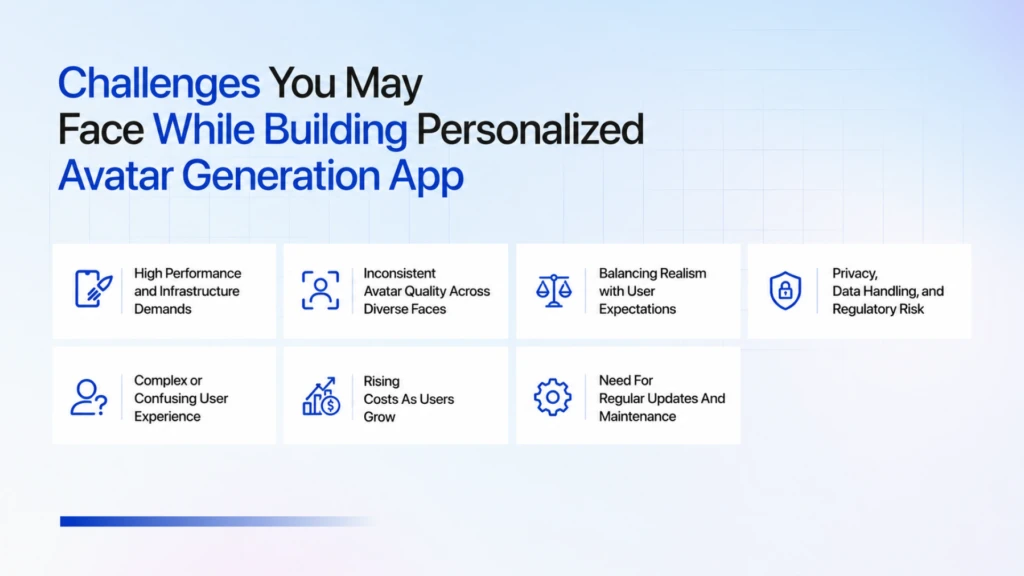
High Performance and Infrastructure Demands
Generating avatars in real time needs strong GPU power and fast cloud infrastructure, especially for batches, 3D, or video. If not optimized, users face slow generation, long waits, and higher server costs, which can hurt engagement.
Inconsistent Avatar Quality Across Diverse Faces
If the AI is trained on limited data, avatars can look off for certain skin tones, facial shapes, or lighting. This makes the app feel biased or unreliable, leading to frustration and loss of trust.
Balancing Realism with User Expectations
Too stylized and the avatar doesn’t feel like the user; too realistic and it may fall into the “uncanny valley” and feel eerily wrong. Finding the right style cartoon, anime, or semi‑realistic requires testing and feedback.
Privacy, Data Handling, and Regulatory Risk
Users upload real photos, so mishandling data raises privacy and compliance issues. Storing or reusing photos without clear consent can damage reputation and even lead to legal trouble if data is leaked.
Complex or Confusing User Experience
A powerful AI backend doesn’t help if the app is hard to understand. If onboarding is clunky, steps are unclear, or options overwhelm users, many will drop off before creating their avatar.
Rising Costs As Users Grow
Each avatar request consumes compute and cloud resources. As the user base expands, AI‑processing bills can spike unless you use efficient models, smarter limits, or tiered plans to keep costs under control.
Need For Regular Updates And Maintenance
Avatar technology evolves quickly. Without ongoing updates, bug fixes, and new style additions, users will move to more active, feature‑rich competitors, even if your app started strong.
How Can TechnoYuga Help You In Personalized Avatar Generation App Development ?
After understanding the AI-Avatar Generation App Development Guide, if building a personalized avatar generation app still feels complex or overwhelming, TechnoYuga can help you build one. With experience in AI, mobile, and web development, we support you through every stage from defining the right features and user flow to selecting the ideal tech stack and AI tools. Whether you’re unsure about performance, cost, privacy, or how to keep the app scalable, we act as a partner who simplifies the process and builds a solution tailored to your audience and budget. So if the roadmap feels tough, you can always reach out to TechnoYuga to guide and build your AI‑avatar generation app the right way.
Conclusion
In 2026, personalized avatar generation apps are no longer just a trendy experiment; they’re becoming a key part of how people show up online. From social media and gaming to remote work, education, and even healthcare, these avatars make digital communication more engaging, expressive, and human.
Building such an app involves clear planning, the right technology, and smart design, but the long‑term payoff is a unique digital identity tool that feels both personal and powerful. If the process still feels challenging, TechnoYuga can help you bridge the gap between idea and reality, turning your AI‑avatar vision into a polished, scalable product that stands out in the crowded digital landscape.
FAQs
The main purpose is to turn a user’s photo into a stylized digital character that represents them online, making their social media, gaming, or professional presence more unique and engaging.
A basic avatar app usually takes around 3–6 months, while more advanced versions with 3D, video, or AR features can take 6–12 months depending on complexity and features.
A strong personalized avatar app should include photo upload, AI‑driven facial detection, multiple styles, real‑time preview, easy export or sharing, and a simple, intuitive user flow.
Cost depends on features and complexity, but basic apps often start around $15,000–$30,000, mid‑range apps fall in the $30,000–$70,000 range, and advanced 3D/AR‑based apps may go from $70,000–$150,000+.
TechnoYuga helps you plan, design, and build a personalized avatar app—from defining features and choosing the right tech stack to integrating AI and launching a scalable, user‑friendly product.